How I Structure an Express.js API with TypeScript, Prisma, and PostgreSQL
Sharing my approach to building and organizing an Express.js API with TypeScript, PostgreSQL, Prisma, Docker Compose, Swagger, testing, and error handling.
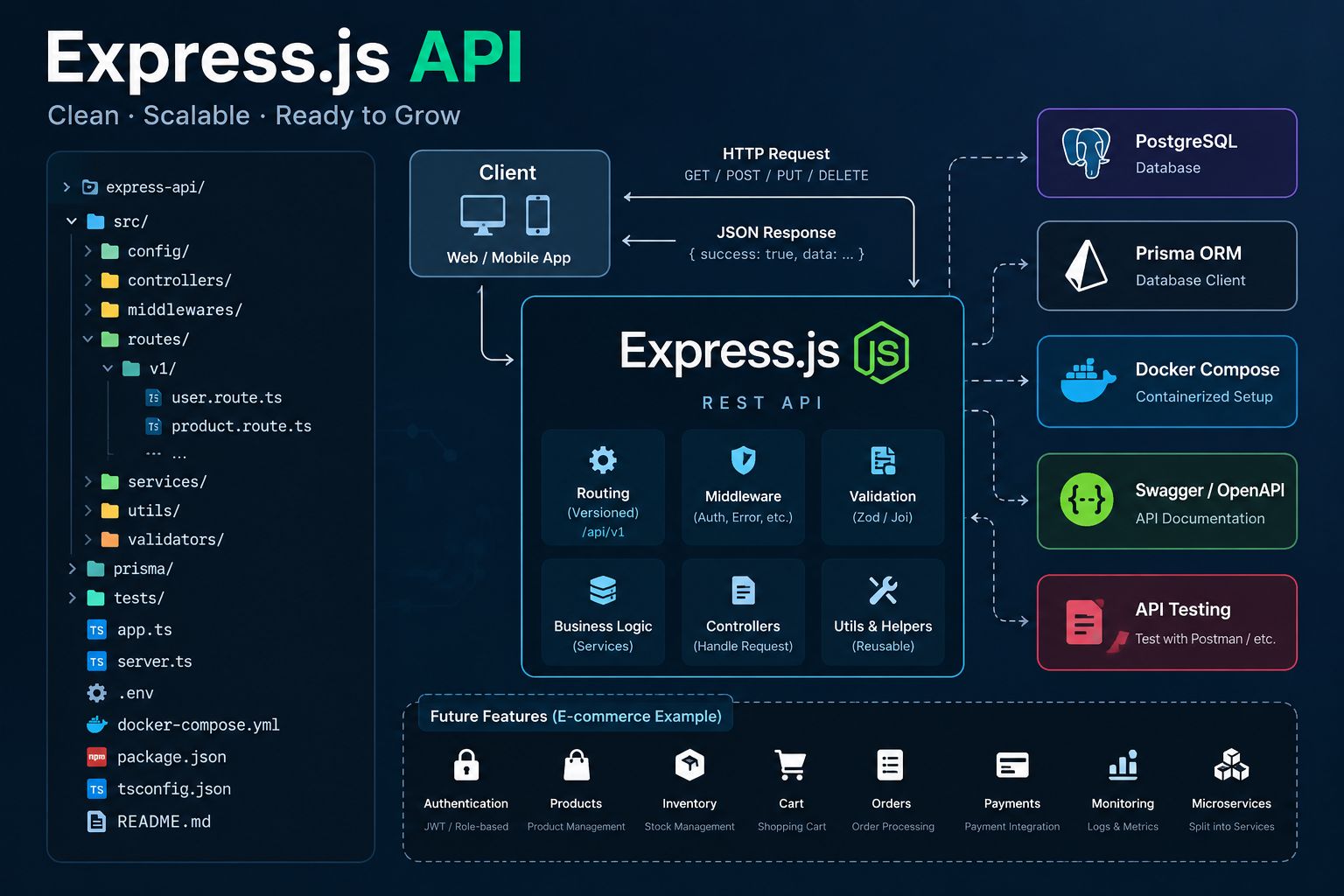
When I start building a backend application, one of the first things I think about is how to organize the project.
A small API might be easy to maintain in the beginning. But as more features are added, the codebase can become difficult to understand if everything is written in the same place.
Based on my experience working with backend applications, I prefer to start with a simple and organized structure that is easy to maintain and can grow over time.
Recently, I've been working on an Express.js API project to practice and share some of the approaches I usually use when developing backend applications.
In this article, I'll walk through the project structure, technologies, and some important decisions behind the setup.
1. Technologies I'm Using
For this project, I'm using:
- Express.js + TypeScript — Building REST APIs with type safety.
- PostgreSQL — Storing and managing relational data.
- Prisma ORM — Managing database schemas, migrations, and queries.
- Docker Compose — Running PostgreSQL in a local development environment.
- Swagger / OpenAPI — Documenting API endpoints.
- API Testing — Verifying endpoint behavior.
- Centralized Error Handling — Keeping error responses consistent.
- API Versioning — Organizing API endpoints for future changes.
I chose this stack because it is practical and doesn't introduce unnecessary complexity for a new project.
2. Project Structure
I prefer separating responsibilities rather than putting routes, database queries, and application logic into the same files.
A simplified view of the project structure looks like this:
src/
├── app.ts
├── server.ts
├── controllers/
├── docs/
├── lib/
│   └── prisma.ts
├── middleware/
└── routes/
    └── v1/

prisma/
├── schema.prisma
└── migrations/

test/
docker-compose.yml
package.json
Each part has a specific responsibility:
app.ts— Configures the Express application and middleware.server.ts— Starts the HTTP server.controllers/— Handles incoming requests and responses.routes/v1/— Defines versioned API endpoints.middleware/— Contains error handling and other middleware.lib/prisma.ts— Provides shared access to the Prisma client.docs/— Contains API documentation.prisma/— Stores database schemas and migrations.test/— Contains API tests.
The goal is not to create many folders unnecessarily. I only want the project to have a clear foundation before adding more features.
3. Separating Routes and Controllers
One thing I try to avoid is putting too much logic directly inside route definitions.
For example, a route can simply define an endpoint and connect it to a controller:
import { Router } from "express";
import {
  getUsers,
  createUser,
} from "../controllers/user.controller";

const router = Router();

router.get("/users", getUsers);
router.post("/users", createUser);

export default router;
The controller handles the HTTP request and response.
When business logic becomes more complex, it can be moved into a service layer.
This makes it easier to read, test, and maintain the code.
The users example above illustrates how I would organize a future feature, rather than a feature already completed in the repository.
4. API Versioning
I prefer organizing APIs by version from the beginning.
For example:
/api/v1/users
/api/v1/products
/api/v1/orders
If the API needs breaking changes in the future, we can introduce another version:
/api/v2/users
This can help maintain compatibility with older clients.
It doesn't mean every update requires a new API version. The main idea is to prepare a structure that makes future changes easier to manage.
5. Centralized Error Handling
Error handling is another important part of a backend application.
Instead of repeating error responses throughout the codebase, I prefer using centralized error-handling middleware.
A simple example:
import type {
  ErrorRequestHandler,
} from "express";

export const errorHandler: ErrorRequestHandler = (
  err,
  req,
  res,
  next
) => {
  console.error(err);

  res.status(500).json({
    success: false,
    message: "Internal server error",
  });
};
This is only a basic example.
In a production application, we should also handle validation errors, authentication errors, and other expected application errors with appropriate HTTP status codes.
Centralized error handling helps keep responses consistent and reduces duplicated error-handling code.
6. PostgreSQL and Prisma ORM
For database integration, I'm using PostgreSQL with Prisma ORM.
Prisma provides a convenient way to define data models, manage database migrations, and write type-safe database queries.
For example, a future user model might look like this:
model User {
  id        Int      @id @default(autoincrement())
  email     String   @unique
  name      String?
  createdAt DateTime @default(now())
}
I also prefer keeping the Prisma client in a shared module instead of initializing a new client in every controller.
This helps make database access easier to manage.
The current project focuses on its foundation. Actual business models can be introduced when their requirements are defined.
7. Docker Compose for Local Development
I'm using Docker Compose to run PostgreSQL locally.
Instead of manually setting up the database every time, I can start the required database service using Docker.
For example:
npm run db:up
npm run db:generate
npm run dev
This makes the development environment easier to set up and more consistent.
As the application grows, additional supporting services can be added when necessary.
8. Swagger / OpenAPI Documentation
I believe API documentation is important, especially when working with frontend developers, mobile developers, or other backend teams.
Swagger / OpenAPI helps document:
- Available endpoints and HTTP methods.
- Request parameters and request bodies.
- Expected API responses.
- Error responses.
- How developers can interact with the API.
For example, Swagger UI may be available locally at:
http://localhost:3000/api-docs
Clear API documentation makes integration easier and reduces unnecessary back-and-forth between development teams.
9. API Testing
I also include API testing as part of the project foundation.
Testing helps verify that endpoints behave as expected and makes future changes safer.
For example, a health-check endpoint can be tested using Supertest:
import request from "supertest";
import app from "../src/app";

describe("Health Check", () => {
  it("should return HTTP 200", async () => {
    const response = await request(app)
      .get("/health");

    expect(response.status).toBe(200);
  });
});
This is an illustrative example. The endpoint path and test configuration should match the actual application.
As more features are added, I plan to include tests for request validation, authentication, business logic, and error handling.
10. Why I Start with a Simple Architecture
Not every application needs microservices from the beginning.
For a new project, I prefer starting with a well-structured monolith.
It is easier to develop, debug, deploy, and maintain while the application is still relatively small.
As the system grows, we can evaluate whether a different architecture is needed based on actual requirements.
For me, good software architecture is not about using the most advanced tools or patterns.
It's about choosing an approach that fits the project and keeps the codebase manageable.
11. What's Next?
This repository is still evolving.
Here are some areas I plan to explore and implement next:
- Authentication and authorization.
- Request validation.
- Business logic and service layers.
- Structured logging.
- Redis caching.
- Monitoring and observability.
- Performance and load testing.
- Additional security improvements.
I prefer adding these features step by step rather than building everything at once.
Final Thoughts
For me, building a good backend application isn't just about making API endpoints work.
It also involves organizing the code, handling errors, writing tests, documenting APIs, and keeping the application maintainable.
I'm using this Express.js project to share some of the patterns and approaches I've learned through backend development.
I'll continue updating the repository as I improve the architecture and add more features.
GitHub Repository: socheatathai/express-api
Thanks for reading!