NestJS Telegram API Request Logger
A small NestJS project that sends API request logs to a Telegram group using an opt-in interceptor and custom decorator.
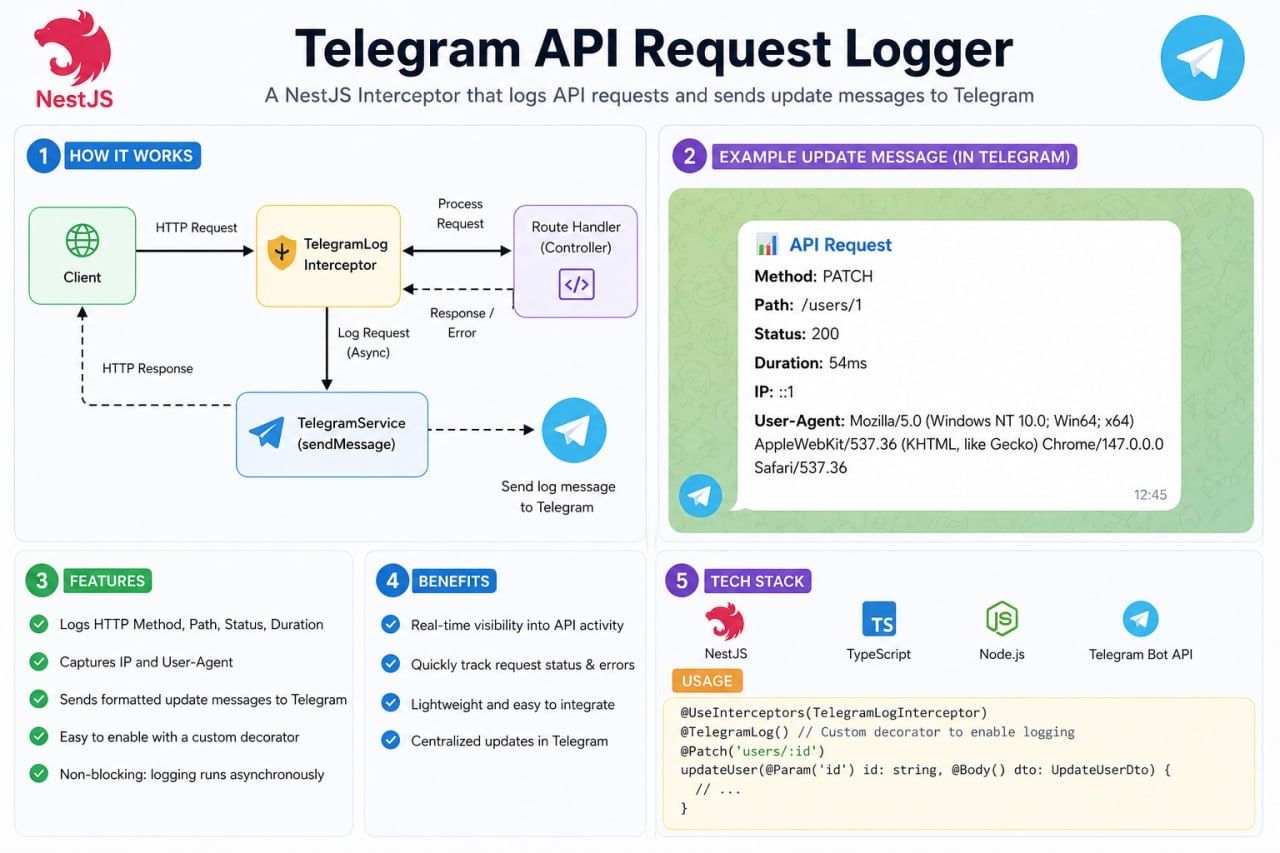
I wanted a simple way to see what was happening in my API without having to keep checking the terminal. So I built a small NestJS project that sends request logs straight to a Telegram group.
The idea is straightforward: when someone calls a route that I want to monitor, the application collects information about the request and sends a formatted message through a Telegram bot. I can check that message on my phone or desktop.
What I built
The project is a NestJS REST API with user CRUD endpoints, PostgreSQL, TypeORM, and Swagger documentation. The interesting part is a reusable Telegram logging feature that can be turned on for individual routes.
For logged requests, the notification is designed to show useful details such as:
- HTTP method and request path
- Response status and request duration
- Client IP address and User-Agent
Instead of enabling Telegram messages for every request, I can choose the endpoints that need them.
How the logging works
The feature uses a NestJS interceptor and a Telegram service.
- A client makes an HTTP request to an endpoint marked with
@TelegramLog(). - The interceptor observes the request and the route handler's response.
- It gathers the details needed for the log message.
- The Telegram service sends a formatted notification to the configured chat.
The goal is to make API activity easier to follow without adding Telegram-specific code to each controller method.
Enabling logging on a route
I created a custom @TelegramLog() decorator so I can opt in to Telegram logging on the endpoints I care about.
import { TelegramLog } from '../telegram/decorators/telegram-log.decorator';

@Get()
@TelegramLog()
findAll() {
  return this.usersService.findAll();
}
In the current GitHub project, logging is enabled on GET /users and GET /users/:id. Other endpoints are not automatically sent to Telegram.
Connecting a Telegram bot
The setup is simple once the API is running:
- Open Telegram, find
@BotFather, and use/newbotto create a bot. - Add the bot to a Telegram group where you want to receive logs.
- Send a message in that group so Telegram has an update to return.
- Call the project's
GET /telegram/chatsendpoint to find the group chat ID. - Add the bot token and chat ID to your local
.envfile.
TELEGRAM_BOT_TOKEN=your_bot_token_here
TELEGRAM_CHAT_ID=your_group_chat_id_here
Keep the bot token private and never commit your .env file. After restarting the API, use POST /telegram/test-message to confirm that the group receives a message.
Running the project locally
Clone the repository and install the dependencies:
git clone https://github.com/socheatathai/nestjs-telegram-logger.git
cd nestjs-telegram-logger
pnpm install
cp .env.example .env
Configure PostgreSQL and Telegram in .env, then start the development server:
pnpm dev
Swagger is available at http://localhost:3000/api. You can test the Telegram connection and make requests to the user endpoints from there.
What I learned
This project helped me practise NestJS interceptors, custom decorators, dependency injection, and integrating a third-party API. I also learned why it is useful to keep Telegram-related code in its own module instead of mixing it into the business logic.
For a small project, Telegram messages can be a convenient way to see selected API activity. For production applications, I would still use structured logs, proper monitoring, and alerting. I would also avoid logging sensitive request data, limit notification volume, and make sure a Telegram failure never interrupts an API response.
This is a small experiment, but it is something I can reuse and improve in future NestJS projects.
You can explore the source code and setup instructions on GitHub.